
You can build an immigration exhibit index using AI by letting software sort, label, describe, and number the documents while an attorney checks every entry. The software takes the repetitive work. The attorney decides what goes in the packet and signs off on the finished index.
The quality of the result depends on what you give the software before it starts and what you check after it finishes. This guide covers both. It also covers the ethics guidance to settle before you upload client files and the filing rules that change the index by forum.
Key Takeaways
- AI can sort uploads, draft index entries, flag missing translations, and rebuild page ranges. The attorney decides which documents go in and approves the finished index.
- Review ABA Formal Opinion 512 (2024) before uploading client files. It requires informed consent before client information goes into a self-learning tool.
- Write a one-page instruction sheet first. It sets the requirement list, label scheme, entry format, and a rule for unclear details.
- Verify every entry against its document, then tie out the packet: page ranges with no gaps, matching document counts, translations behind originals.
- Immigration court expects a table of contents with page numbers when proposed exhibits are filed. The USCIS filing regulation does not require an index.
Where AI Fits in an Exhibit Index
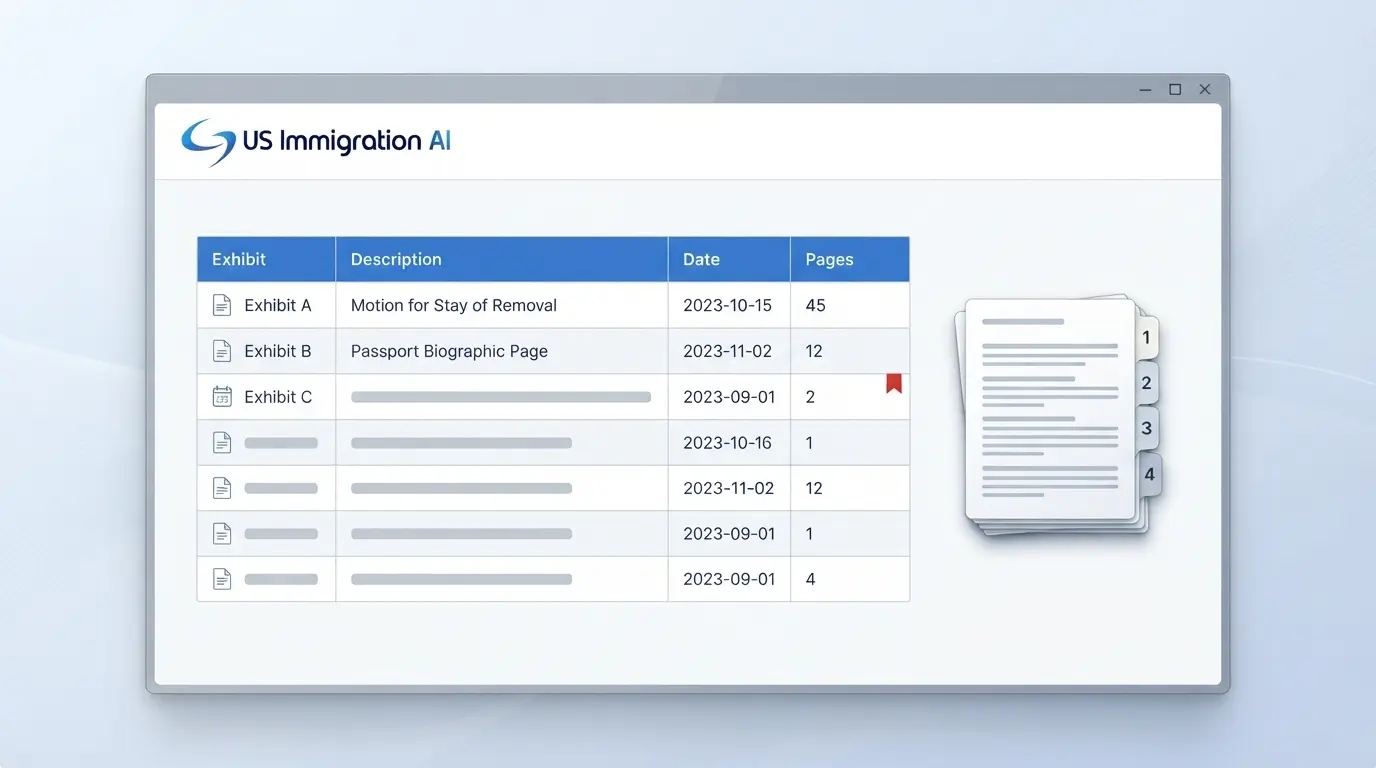
An exhibit index is a table of contents for your evidence. It tells the officer or judge what each exhibit is, what it supports, and where to find it. A working index has four columns: exhibit label, description, document date, and page range.
Whether an index is required depends on the forum. The USCIS filing regulation, 8 CFR 103.2, does not require one. Chapter 2.3(c)(3) of the EOIR Immigration Court Practice Manual says filers should include a table of contents with page numbers when they submit proposed exhibits.
AI handles the mechanical parts of this work. The table shows how each task divides between the software and the attorney.
Settle Confidentiality and Supervision Before You Upload
Check your obligations under ABA Formal Opinion 512 before any client document goes into an AI tool. The American Bar Association's Standing Committee on Ethics and Professional Responsibility issued Formal Opinion 512, "Generative Artificial Intelligence Tools," on July 29, 2024. It applies three Model Rules to AI use.
Under Rule 1.1 (competence), lawyers need a reasonable understanding of a tool's capabilities and limitations. They do not need to become experts. Under Rule 1.6 (confidentiality), lawyers must make reasonable efforts to prevent unauthorized disclosure of client information. The opinion says informed consent is required before client information goes into a self-learning tool. Boilerplate in an engagement letter does not meet that standard.
Rules 5.1 and 5.3 cover supervision. Managing lawyers should set firm policies on AI use and train staff, and they should vet outside vendors for security, confidentiality, and data retention. A short pre-launch review covers most of this:
- Read the tool's terms and privacy policy for how it stores and reuses client data.
- Find out whether the tool learns from your uploads, and get informed consent from the client if it does.
- Write a one-page firm policy that names who may use the tool and for which tasks.
- Ask the vendor about encryption, access controls, and how long data is kept.
- Compare the answers with how US Immigration AI describes its approach on its data security and compliance page.
Write the Instruction Sheet Before You Upload Anything
Software drafts to the rules it is given, so write them down first. A one-page instruction sheet has four parts: the requirement list, the label scheme, the entry format, and a rule for unclear details. The attorney writes the requirement list and label scheme. A paralegal can complete the rest.
Reuse the sheet on every case of the same type. That keeps entries consistent across your firm, whoever prepares the packet. Here is a sample for a marriage-based petition:
Case type: Marriage-based family petition
Requirements: A. Petitioner's status. B. The marriage. C. End of prior marriages. D. Bona fide relationship.
Labels: One exhibit letter per requirement (A to D). Documents inside an exhibit are numbered A-1, A-2, and so on.
Entry format: Issuer or author, document type, subject (date). Use only what appears on the page.
Unclear details: If a name, date, or issuer is hard to read, write [UNCLEAR] in its place. Do not guess.
Foreign-language documents: Put the certified translation in the same entry.
The last rules give the reviewer something to find. A tool left to fill a gap on its own may produce a plausible entry that is wrong. The five passes below all draw on this sheet.
Let AI Sort the Documents, Then Map Them to Requirements
Start by letting the software read the uploads and group them by type and date. It can also remove duplicates and label each file, which clears the pile before anyone makes a legal judgment. Documents that clients upload against a visa-type checklist in a client portal arrive already tied to a requested item.
The attorney then maps the groups to the requirements on the sheet. Each requirement becomes a section of the index. A document the software cannot place goes to the attorney. A document that proves nothing on the list comes out, because unexplained evidence invites questions.
Two checks protect this pass. Duplicate removal can drop a legitimate near-duplicate, such as two bank statements with identical layouts, so review everything it removed. Record the upload count now, because you will compare it with the index count at the end.
Freeze the Labeling Scheme Before AI Numbers Anything
Choose the label scheme before anyone drafts the cover letter or brief, because every later citation depends on it. The practice manual, at Chapter 2.3(c)(4), says parties should use alphabetic tabs starting with "A" in cases with paper records. 8 CFR 103.2 does not prescribe a scheme.
One workable approach for large petitions is numbers with sub-letters. Exhibit 4 covers one criterion, and 4A through 4F hold the individual documents. Once a letter or brief cites "Exhibit 7," that label is fixed. A late document goes in as 7A or at the end of its section.
Two handling rules keep the scheme clean:
- When one document supports two requirements, file it once under the first. Under the second, add a cross-reference line, such as "See Exhibit C, pages 12 to 14."
- Software can apply the scheme to every file and carry the labels into AI-assisted drafting of the letter. A person should still confirm each citation against the final index.
Have AI Draft the Descriptions, Then Check Every One
A good description identifies the document without the reader opening it. It names the author or issuer, the document type, the subject, and the date. Software can pull those details from a scan and draft the entry using the format on your sheet.
Published material needs more detail. Under Chapter 2.3(e)(2) of the practice manual, the entry should carry the precise title, date, and page numbers. State Department country reports must show the year of the report. The sample in Appendix L of the EOIR Policy Manual shows the level of detail EOIR uses for ordinary entries.
Software that reads scans can misread a date or a name, and it can merge two documents into one entry. Compare each entry with the document itself, and resolve every [UNCLEAR] flag against the original. The same rule covers legibility: the practice manual says illegible copies may be rejected or excluded from evidence, so rescan anything the software cannot read.
Let AI Flag Translations and Gaps
A foreign-language document needs its English translation filed right behind it, under the same exhibit label. Under 8 CFR 103.2(b)(3), a USCIS filing needs a full English translation. The translator must certify that it is complete and accurate and that they are competent to translate.
Immigration court adds detail. Chapter 2.3(a) of the practice manual says the certification must be typed, signed, and attached to the document, with the translator's address and phone number. Appendix F has a sample certificate.
The check is the same on every file, which makes it a good job for software. It can list each foreign-language document with no translation behind it and flag other gaps in the packet. The attorney then confirms the certifications meet the rule. In the index, name both pieces in one entry: "Birth certificate of respondent, with certified English translation."
Let AI Paginate and Rebuild the Index After Each Change
Page numbers go on last, because any document added, removed, or moved shifts every page range below it. By hand, that means recounting the whole packet. US Immigration AI's case assembly builds a labeled index and applies continuous pagination. The labels and page numbers update when exhibits are added, removed, or reordered.
The numbering rules differ by forum. For immigration court, Chapter 2.3(c)(3) of the practice manual asks for consecutive page numbers at the bottom center or bottom right of each page. For USCIS, the Tips for Filing Forms by Mail page asks that each form's edition date and page numbers stay visible at the bottom. Number the evidence pages and leave the government forms alone.
With numbering done, the packet is ready to be assembled for its destination.
Assemble the Packet for Where It Is Going
The index stays the same across forums, but the physical handling does not. Check the destination's rules before the software produces the final file.
USCIS Filings by Mail
USCIS asks filers to avoid binders or folders it cannot easily take apart. It also asks that evidence not arrive in photo albums, scrapbooks, or on digital media. Its lockbox filing tips say to avoid heavy-duty staples and use fasteners or heavy clips, and to place supporting documentation behind the application. Check the current Tips for Filing Forms by Mail page before assembling a paper packet, since tab and clip guidance has changed over time.
USCIS may also ask for an original document at any time under 8 CFR 103.2(b)(5). Keep originals where the team can find them.
USCIS Online Filings
Online filings have no physical tabs, so the exhibit label moves into the file name. A file called "Exh-04B_Ruiz-Letter_2026-03-03.pdf" tells the officer what it is before it opens. Upload the index first so the officer has a map of everything after it. Check the form's online instructions for file type and size limits.
Immigration Court Filings
Chapter 2.3(c)(1)(B) of the practice manual sets the order of a proposed exhibit package. It runs: Form EOIR-28 if required, cover page, table of contents, proposed exhibits, and proof of service. Paper filings use alphabetic tabs on the right side. For cases with an electronic record of proceedings, the manual encourages paper separators, such as a sheet reading "Tab A," in place of indexing tabs.
Three more rules affect the index:
- File photocopies of supporting documents. If they are filed after the master calendar hearing, note that originals are available for review.
- In a consolidated case, a master exhibit may go in the lead individual's file with the judge's approval.
- When a party files more than one application, the manual encourages a separate evidence package and table of contents for each.
What the Attorney Must Check Before Filing
The attorney owns the finished index. Under Chapter 2.3(b) of the practice manual, a signature certifies that the signer has read the document and that it is grounded in fact. That applies to an index the software drafted as much as one typed by hand.
EOIR addressed AI directly in Policy Memorandum PM 25-40, "Use of Generative Artificial Intelligence in EOIR Proceedings", effective August 8, 2025. It says parties should confirm the accuracy of AI-assisted work. Practitioners who submit erroneous AI-generated content likely violate professional conduct obligations. Attorneys who knowingly or recklessly offer false evidence may face discipline under 8 CFR 1003.102(c).
Run a tie-out on the final printed or exported packet. Assign it to a named person, usually the supervising attorney, and keep a short log of what it catches. If the same error repeats, revise the instruction sheet.
- Every index entry matches its document's issuer, type, and date, and every [UNCLEAR] flag is resolved.
- Page ranges run in order with no gaps or overlaps, and the last page number equals the packet's total page count.
- The upload count matches the index count, with each removed duplicate and omission explained.
- Every exhibit cited in the cover letter or brief appears in the index under the same label.
- Every foreign-language document has its certified translation directly behind it.
- Every cross-reference line points to a real exhibit and page range.
Extend the Index for an RFE Response
A response to a Request for Evidence works best as a continuation of the original index. If the petition ended at Exhibit 24, start the response at Exhibit 25 so no label repeats in the record. Order the new entries by the issues the notice raises, in the same order it lists them.
Under 8 CFR 103.2(b)(11), all requested materials go in together at one time, along with the original RFE or Notice of Intent to Deny. A partial submission is treated as a request for a decision on the record. Paragraph (b)(8)(iv) of the same regulation sets the response period at a maximum of twelve weeks for an RFE and thirty days for a NOID. No extra time is granted.
USCIS also tells filers not to mail RFE responses to a lockbox. Send the response to the address on the notice.
Grow Your Caseload With US Immigration AI
US Immigration AI sorts client documents, builds the labeled exhibit index, applies pagination, and flags missing items. Your team spends less time on tab order, and a licensed attorney at your firm reviews every file before it goes out. Schedule a demo to see case assembly run on one of your own case types.
Frequently Asked Questions